A calmer dashboard
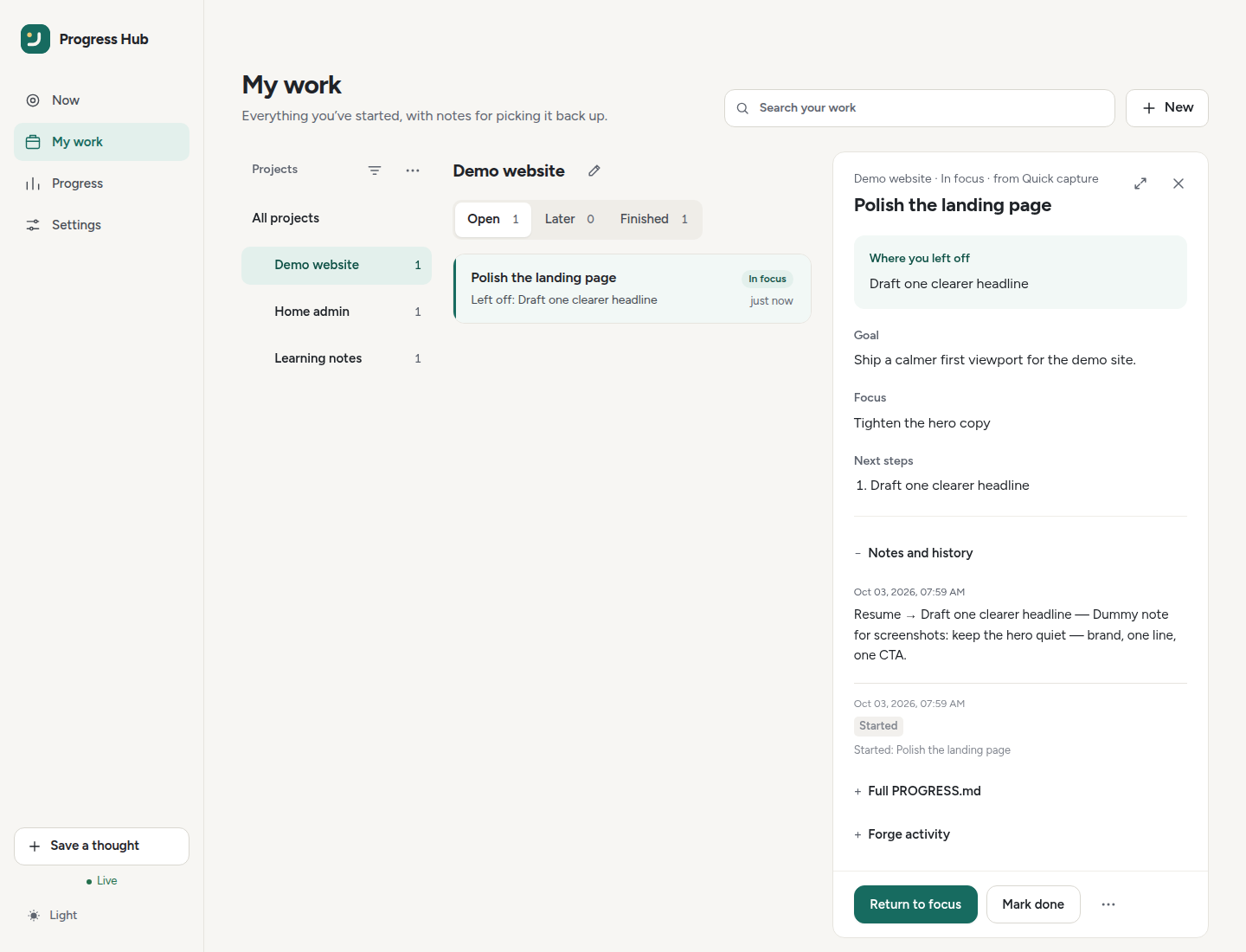
Desktop My work with the Notes & context reader. See the README screenshots for Now, Progress, and Settings (gallery shots use dummy data).
Getting around
The dashboard has four main areas:
| Area | Use it for |
|---|---|
| Now | One current step, resuming, pausing, and Focus mode |
| My work | Browse projects and unfinished/finished threads |
| Progress | Activity, counts, and optional rewards |
| Settings | Appearance, connections, sync, AI helpers, and data |
On desktop, the compact Appearance button cycles System → Light → Dark. The same choices live under Settings → Appearance; on mobile, use Settings. The browser remembers the preference when storage is available.
Now: one step at a time
The Now screen keeps one chosen step in front of you.
The main card can show:
- Your next step, You’re on it, or Welcome back;
- the project and last-touch time;
- Where you left off when a saved resume step is specific enough to restart from.
Before starting:
- Start this step or Resume begins the work;
- Choose something else picks another thread;
- Help me choose ranks quiet/stale open work and shows a concrete resume cue when one is saved.
While working:
- Mark step done completes it;
- Pause and leave a note saves the next pickup action. If that note is missing or vague, a quiet hint sits under the field. Use Focus or Use next step copies an existing line into the field for you to edit or undo; nothing is saved until you pause. Pause, save, and done stay available either way;
- Focus mode can hide extra information and optionally run a 15-, 25-, or 45-minute timer.
The ⋯ menu contains secondary actions such as Choose another step, Open in My work, Copy agent prompt, and Mark step done when you are not mid-step.
After completion, the toast offers Undo. A failed undo can be retried; once undo has succeeded, a later Retry refreshes the UI only and does not send the undo twice.
Below the card, the dashboard links to open steps, this week’s finished steps, and projects. Gentle checks show due reminders and older work that may need a keep/snooze decision. Finished threads remain under My work → Finished.
My work: browse and review
Desktop My work uses two columns: projects on the left and steps on the right.
Each step row keeps only the useful scan information visible:
- title;
- Left off: a concrete resume step, or the scan line when that step is missing or too vague to restart from;
- project name while viewing All projects;
- relative last-touch time;
- a badge only for In focus or a source issue that needs review.
Click a row to open its notes beside the list.
While a step is open, Check for similar steps looks for possible overlap in the same project. A quiet Possible overlap link appears only when a suggestion is waiting. Opening it does not merge or close anything. A safe merge is offered only when both steps are unfinished local work with the same finishable goal; you confirm that in a separate step. Other pairs stay separate, with a short reason. Hide this suggestion only hides it on this browser.
Search, create, and review
Search your work matches titles, resume steps, goals, scan lines, projects, and progress snippets. The New menu contains New project and Leave a reminder.
When an action needs a yes/no decision, a single Needs you line appears above the list. Open Review to handle:
- agent project-change approvals;
- forge import offers;
- due reminders.
When nothing needs attention, the line disappears. Focus mode keeps the list usable and adds Back to Now.
AI helpers and scan lines
Scan lines are heuristic by default. Optional LLM rewriting is available under Settings → AI helpers or through ADHD_HUB_AI_* settings (see environment variables).
What a scan line can use
- Status-history audit lines such as
[status→open] Undone from …are excluded. - An older eligible human note is preferred over ritual/status text.
- Empty is acceptable when there is no useful continuity cue.
- The card shows up to two wrapped lines, then ellipsises.
Configure AI helpers
In Settings → AI helpers:
- choose a Base URL preset or custom URL;
- use Test and load models to fetch chat-capable models;
- choose the model and timeout;
- save the settings.
Gemini OpenAI-compatible ids drop a leading models/ or google/ prefix. Embedding, image/TTS, and deprecated-for-new-users Gemini flash entries are filtered; prefer a current chat model from the loaded catalog, such as gemini-3.8-flash.
The default timeout is 15 seconds. Local or proxied models can use up to 30 seconds.
If the AI response is stubbed, truncated, or fails, Hub falls back to the heuristic line. Error toasts include the outbound model id and a scrubbed provider snippet; timeout errors suggest increasing Timeout.
Manual and automatic rewrites
- Rewrite scan lines on their own is off by default and only rewrites when the content hash changes.
- Summarise notes on their own is also off by default and follows the same cached-input behavior.
- Rewrite scan line handles one thread from the reader ⋯ menu.
- Rewrite all scan lines handles open threads in the selected project scope from the project ⋯ menu.
Batch rewrites confirm first and allow only one batch per project at a time. A second run returns a calm busy state / HTTP 409. The progress toast stays sticky and reports completion only when useful progress exists; live refreshes keep the action disabled as Rewriting… while the batch is active.
Live updates and PWA
Open Hub pages listen for authenticated live updates (SSE) and refresh relevant data shortly after Hub-side changes. If the live connection drops, ordinary Refresh and API use still work.
The installable PWA caches the UI shell only. When a newer shell is waiting, a sticky Refresh toast lets you activate it; the Hub never forces a mid-task reload.
Sync health
Under Settings → Issue sync, Last sync shows:
- the last successful or failed forge reconciliation;
- concise errors and conflicts that need review;
- recent activity-ledger changes;
- Sync now / Retry sync for background jobs.
Capture, pause, and return
Use Save a thought for a quick capture without leaving the current task.
When stopping:
- choose Pause and leave a note;
- write the smallest useful next action;
- choose Save and pause.
Keep working or Escape cancels. The saved action appears under Where you left off when you return.
Saved resume content supports Markdown headings, lists, emphasis, and tables. Raw HTML is escaped and remote images are shown as text descriptions.
Open, Later, and Finished
These states share one segmented control beside the project title. Later holds older open work without turning it into an overdue warning. The soft Still relevant? check appears only on Now, and nothing is auto-dismissed.
Projects and hierarchy
Select a project to filter My work. The project header provides:
- pencil → edit project;
- external-link icon → open the configured repository;
- ⋯ → project actions such as Rewrite all scan lines when AI is enabled.
Projects can nest in a parent/child tree. Selecting a parent includes all descendants and aggregates their open counts.
Reorder or nest projects
- Drag the six-dot grip to reorder or nest.
- Desktop shows the grip on hover; touch devices keep a larger grip visible.
- Keyboard users can focus the grip and press Up/Down to move within siblings.
- Inbox is never draggable.
Menus close on Escape and return focus to their trigger. They also flip upward when there is not enough room below.
Tags and repositories
Tags remain separate from hierarchy. Suggest tags proposes heuristic tags but applies only the choices you confirm.
Add an HTTP(S) repository URL to expose repository actions. URLs containing credentials are rejected. Choose This project has no repository when the project is only an organisational folder; forge sync no-ops for those.
Project settings opens with the basics (name, description, tags, repository). More options folds the short name (slug), parent project, issue sync connection, folder on your computer and the issue sync overrides (owner, repository name, wiki path, board id). Rename short name… and Delete project… sit on their own row at the bottom. Every dialog shares one pattern: a title row with a Close (X) button, labelled fields stacked one per row, and the main action first with a quiet Cancel beside it. Escape or Close always cancels. Notifications (toasts) stack in the corner with a coloured dot for their kind, an optional action such as Undo, and a full-size dismiss button.
Optional small wins
In Settings → Appearance, turn Gentle rewards on or off and choose a daily goal of one, three, or five finished threads. Rewards start off by default. These preferences are saved per browser.
- Each currently finished thread contributes 10 XP. Every five finished threads adds a level.
- XP is calculated from actual hub records, including completions made by assistants; refreshing or repeating a completion does not add another thread's XP. Completion retries preserve the original date and do not append duplicate status notes.
- Daily counts and the activity chart use the hub's configured timezone. Taking a break does not reset your level.
- Completing a thread shows one short, quiet acknowledgment in the shared toast stack (alongside the Done/Undo toast when both appear). There are no sound effects, confetti, or streak penalties, and reduced-motion preferences are respected. Undo dismisses the rewards cue so it does not overlap the Restored toast.
- Rewards reflect the current data: reopening/deleting completed work or restoring a backup can change totals. They are not a separate permanent reward ledger.
The daily goal is an optional cue, not a deadline. It can be changed or switched off at any time.
Switching projects clears the previous project’s actions while the new one loads. Late responses cannot overwrite a newer selection; failed loads show a retry message.
Settings
Settings is grouped into:
- You — Appearance and Account;
- Connections — Coding agents, Remote access, Phone alerts, Issue sync, AI helpers;
- Data — Your data (backup/restore, refresh, optional Load sample data / Remove sample data for a generic walkthrough pack that never overwrites real work; or set
ADHD_HUB_SEED_DEMO=trueon boot).
Rarely used fields sit under Advanced. Appearance settings save as you change them. Sections that contain keys/tokens, plus coding-agent defaults, keep an explicit Save button.
On phones, Settings opens to the section list and each page has All settings to return. AI helpers are off by default. Forge configuration is documented in Forge permissions.
Progress and sharing
The Last 14 days card shows steps added, steps finished, open count, and this-week count. Hover/focus a day for details or choose Show as a table for the same data in rows.
With rewards enabled, Progress also shows:
- rank, level, and XP;
- progress toward the next rank;
- today's gentle goal;
- milestones marked Earned or Not yet.
Share progress previews the exact export before anything leaves the browser. You can download a PNG, copy text, or use the device share sheet when supported. Nothing is posted automatically.
The export omits task titles, project names, notes, connection details, and private Hub URLs. There is no public leaderboard.
See the brand guide for palette, assets, buttons, milestone thresholds, and tone of voice.
The Settings footer links to the public GitHub repository and shows the running server’s version from /api/health. Share text includes the public repository link, and PNG cards print its URL in the footer. Your private hub address is never used for that attribution.
Project tags and parent links are preserved when you rename a project slug. Archiving a parent clears children’s parent links so they become top-level again. The organiser adds only the selected tags and preserves project settings (including parent). Projects archived after suggestions were loaded, or selections exceeding the eight-tag limit, are skipped so you can review them again.
Workspace overview and controls
Now includes open-step, weekly completion, and project counts below the chosen step. Focus mode hides the overview to keep a single task in view. Counts use the same live overview as Progress.
Project search and tags stay tucked behind the filter button at the top of the projects list. It reveals Find a project (name, slug, or tag), tag chips, and a result count; closing it clears both, so no hidden filter is left behind. The Projects rail shows a collapsible parent/child tree with unlimited nesting (expand state remembered in this browser). On desktop, drag a project onto another to nest it, or into the gap between rows to reorder siblings; parent_slug and sort_order persist. On small screens the rail opens as a full-screen left drawer (backdrop, Escape, focus trap). Drag the six-dot grip to nest or reorder — while dragging, the list auto-scrolls near the top/bottom edges so off-screen targets stay reachable. After a drop (or a cancelled drag), the drawer stays open so organising can continue: a move refreshes the tree via loadAll without closing the drawer, and only an intentional project pick (or All projects / close / backdrop) dismisses it. Ghost clicks and backdrop taps from the same pointer release are ignored briefly. Suggest tags and the drag tip live in the list’s ⋯ menu so switching projects remains the primary browse action. Nested rows remain inside the viewport rather than requiring horizontal scrolling. Project rows show open-step counts; zero-open projects are visually quieter without being hidden. Archived projects (n) stays collapsed at the bottom. The edit form Parent select remains available as a touch-friendly fallback for hierarchy changes.
The reader keeps one primary action, Focus on this (or Return to focus), beside Mark done and a ⋯ menu. The menu names where the step came from and holds Open issue #, Refresh from source issue, Copy link, and, when AI is on, Summarise notes with AI and Rewrite scan line. A source issue that has changed or conflicts shows as a short notice above the notes, with Review changes. A live refresh keeps the reader on the same step while it is still listed.
Light uses warm paper surfaces and teal controls; dark uses charcoal surfaces and mint controls. Text is set in the bundled Figtree font. Theme cycling and AI Test / Load Models settings remain available.
Appearance also offers named accent presets (Indigo keeps the previous look) and a custom colour picker. The selection saves in this browser; Default restores the two built-in palettes. Custom shades adapt to maintain readable text and selected states in light and dark mode. Status and warning colours keep their semantic roles.